Independent Windows software

Good tools make room for better work.

Meet two separate editions of Local Work Assistant. Choose the focused everyday toolkit or the broader workspace with PDF tools and offline OCR.

Windows 10 / 11 · x64One-time purchaseLocal tools work offline
THE EXPANDED EDITIONREAL APPLICATION SCREEN
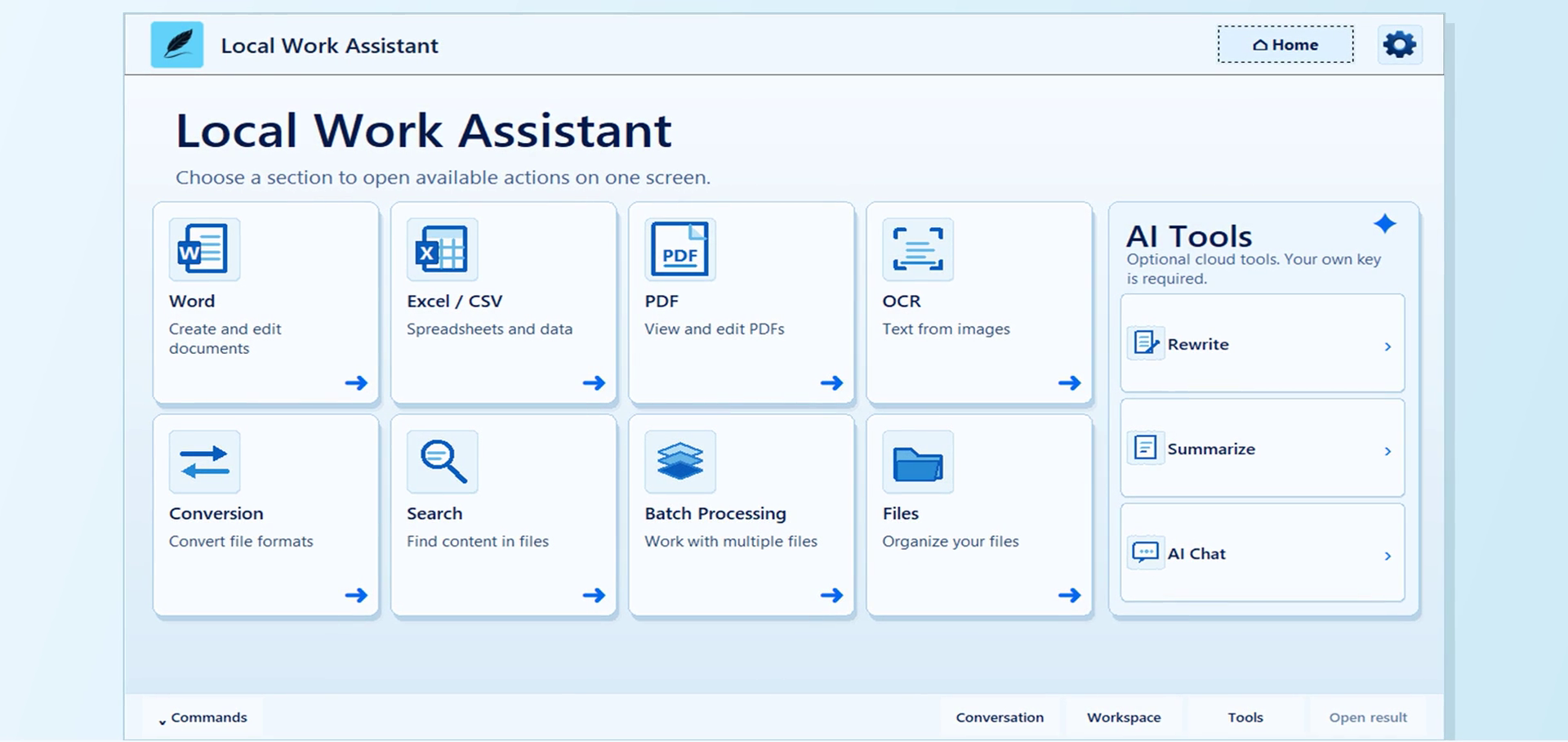
Real Local Work Assistant expanded edition home screen showing Word, Excel/CSV, PDF, OCR, Conversion, Search, Batch Processing and Files
Built for real files on your own computer€85 edition

Aurummonya is the home for these programs. Local Work Assistant is the application. Both offers below are genuine Windows products, with different capabilities and separate prices.

Two ways to work

Choose the edition that fits.

Both are one-time purchases. The €59 edition is a simpler product; the €85 edition adds more document, PDF, OCR and file tools.

Focused edition€59 one-time

Local Work Assistant

A practical, lighter toolkit for everyday local office tasks.
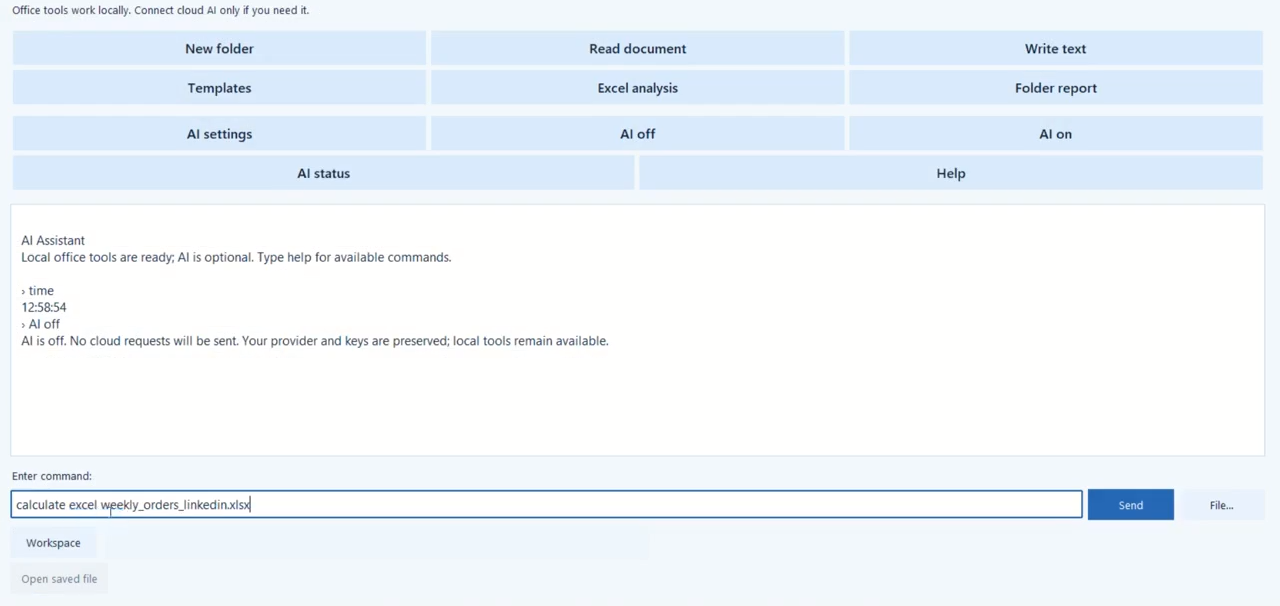
Real screen of the earlier Local Work Assistant edition showing quick actions for files, templates, Excel analysis and an English command interface
Actual interface from the earlier edition’s demonstration.

What it is for

  • Read supported TXT, MD, DOCX, text-based PDF, CSV and XLSX files
  • Create text files, folders and documents from included templates
  • Run six local Excel / CSV analysis modes and make folder reports
  • Use local calculations and optional cloud AI with your own key

Interface: English, with English and Russian command support. This edition does not include offline OCR or the expanded PDF editing tools.
See details
Expanded edition€85 one-time

Local Work Assistant

A broader Windows workspace for documents, spreadsheets, PDFs and scanned text.

Real expanded Local Work Assistant home screen with dedicated sections for Word, Excel/CSV, PDF, OCR and other tools
Actual home screen of the expanded edition.

What it is for

  • Create and edit supported Word and Excel / CSV files
  • Work with PDF pages and supported PDF content
  • Recognise English and Russian text in images and scanned PDFs offline
  • Search, convert and process supported files in batches

Interface: English and Russian. Cloud AI is optional and requires your own supported provider key and internet access.

Now available on Microsoft Store

View on Microsoft Store
See details

The €59 edition

The essentials, kept close.

Work with common documents, spreadsheets and folders from a compact application. Its local functions remain available without an AI key or an internet connection.

Office basicsRead supported files, write TXT / MD, create folders and use five included document templates.
Table insightsSummaries, min/max, duplicate checks, overdue dates, matching rows and grouping for supported Excel / CSV data.
Optional AIChoose a supported provider and supply your own key for cloud features; local tools do not depend on it.
See the full comparison
0:00 / 0:00

Recorded from the real earlier edition. The interface and command bar shown in the video are part of that product.

The €85 edition

More of the work, in one place.

Dedicated sections bring together supported Word, spreadsheet, PDF, OCR and file workflows. The expanded edition offers a bilingual interface and keeps its core operations local.

Documents and dataWork through forms for supported Word and Excel / CSV operations.
PDF and scanned textUse supported PDF tools and local English / Russian OCR components.
Files and optional AISearch and batch tools, with cloud AI available only when you connect your own key.
0:00 / 0:00

A 50-second demonstration recorded from the real expanded application.

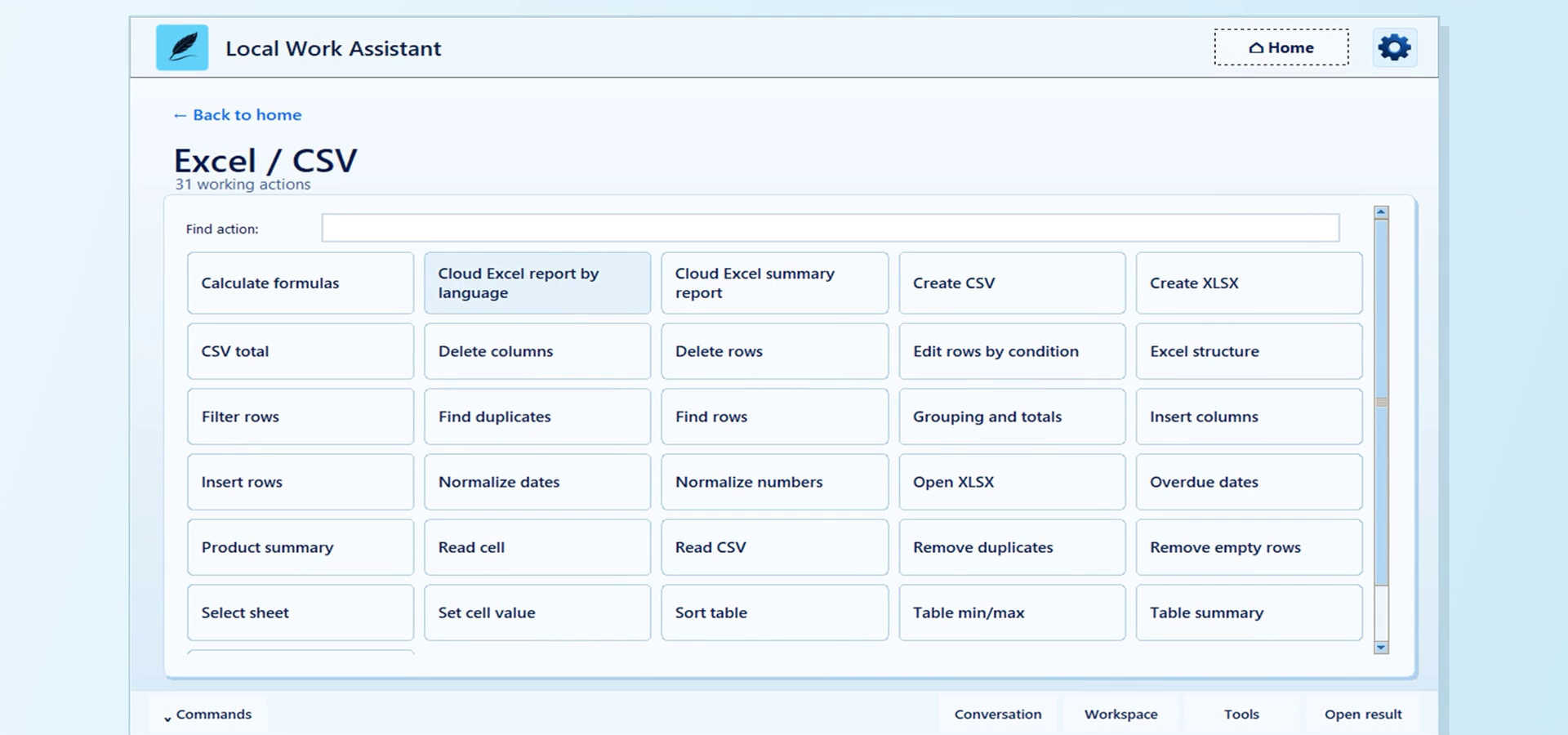
Real expanded edition Excel and CSV action screen
Excel / CSV workspace
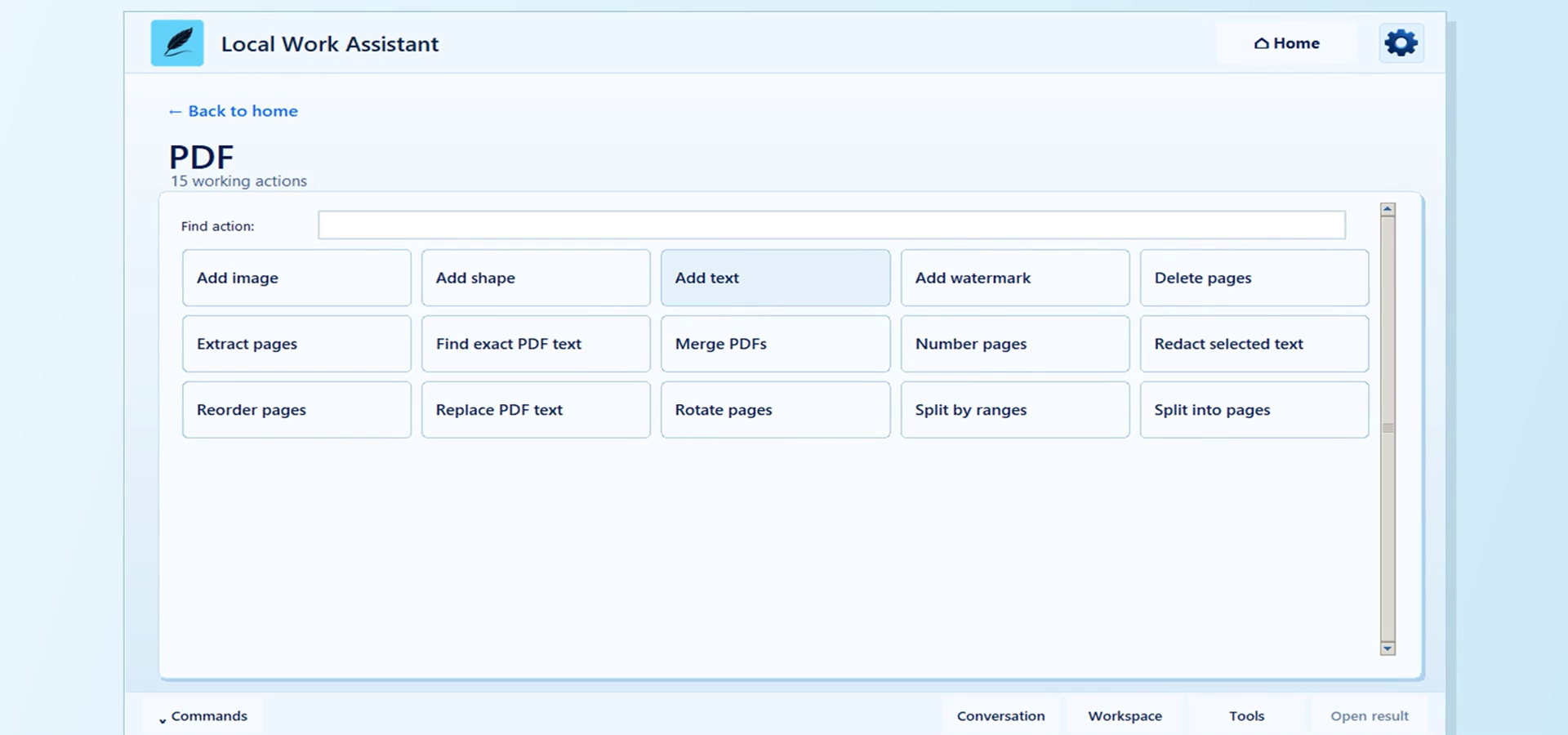
Real expanded edition PDF action screen
PDF workspace

At a glance

A clear difference, before you order.

Capabilities below refer to supported file types and operations. Complex documents may have their own limits.

Comparison of the €59 and €85 Local Work Assistant editions
Capability€59 edition€85 edition
Windows 10 / 11, x64IncludedIncluded
Local use without AI or internetCore toolsCore tools
Interface languageEnglish; EN / RU commandsEnglish and Russian
Text files and document templatesBasic tools and five templatesExpanded Word and file tools
Excel / CSVSix local analysis modesBroader reading, editing and analysis
Text-based PDF readingIncludedIncluded
PDF page and content toolsNot includedSupported operations
Offline OCR, English / RussianNot includedIncluded
Search and batch toolsBasic file and folder workDedicated sections
Optional cloud AIOwn provider keyOwn provider key

Neither edition requires a cloud AI subscription from us. Provider charges, if any, depend on the account and key you choose to use.

Simple, personal ordering

Choose your edition. Send a request.

Select an edition, then send your request here in the browser. We will reply with the next steps. There is no checkout or instant download on this website.

Questions? joxnere@gmail.com

A few practical answers

Good to know.

Do I need an internet connection?

The supported local tools run without internet access. Optional cloud AI requires a connection and your own provider key.

Can the €59 edition recognise scanned PDFs?

No. Offline OCR and the expanded PDF tools belong to the €85 edition. The €59 edition can read supported PDFs that already contain a text layer.

Are the screenshots real?

Yes. The screenshots and demonstration videos on this page come from the actual application interfaces. The earlier edition’s window displays its original “AI Assistant” heading.

How do I receive the program?

Send a request through the order form for your chosen edition. We reply with purchase and delivery details; there is no automatic checkout or public installer download on this site.